
Build a Live Dashboard for Your Job Search
Point AI at the job boards, the VC boards and Whispered, and open a scored shortlist every morning instead of a blank spreadsheet.
The hardest part of a senior search is the first two weeks, and it is hard for a boring reason: there is nothing to work on yet.
Getting started is hard
You know roughly what you want. You do not yet know where it is. So the first fortnight goes on setup — building a list, hunting for roles across a dozen places that each hold a different slice, working out who you know at each one.
None of it feels like progress, and it is where most searches stall. Two weeks in, the usual state of play is a spreadsheet you have stopped trusting and nineteen tabs you cannot close.
Get clarity before you start your search
Before any of this is worth automating, get clear on what you are actually looking for. A search without that is a search you cannot aim — and a board scoring roles against a vague description will just hand you a vague list, faster.
It is also the step most people skip, because interviewing feels like progress and thinking does not. Our Career Clarity playbooks cover it properly. The short version:
- Niche down, hard. Your instinct is to cast wide so you miss nothing. It backfires: a network can expand outward from a narrow ask, but it cannot reduce a broad one down to something it can act on. See knowing your niche.
- Do not be a generalist. The more senior you get, the more you need to be known for one thing. As one top VC talent partner put it, a jack of all trades may be brilliant, but they struggle to get traction. Company and role clarity walks through choosing.
- Write a working thesis. A few lines: the problems you solve, the role you want with a clear function and level, and the company profile you are targeting. Career thesis has the format.
- Pick your company profile deliberately — stage, space, location, business model. A handful of descriptors is enough to search with focus.
That work is not separate from the board. What you write is what the board scores against, so the sharper your thesis, the better everything below it works.
How you can hit the ground running
Once you know what you are looking for, you can be looking at real roles the same day. There are two halves to the market, and both are reachable:
- Posted roles — a lot of this you can now automate. The job boards, the ATSs, the VC portfolio boards. The tools already exist; the next section lists them.
- Unposted roles — these come from Whispered. That half matters because VP+ roles are increasingly unposted, so the posted sources turn up volume and a lot of it is noise you will pass on.
Then take the criteria you just wrote and drop them straight into the dashboard. That is the whole setup. Your thesis, your deal-breakers and your target titles go in once, and from then on every role any source turns up is scored against them.
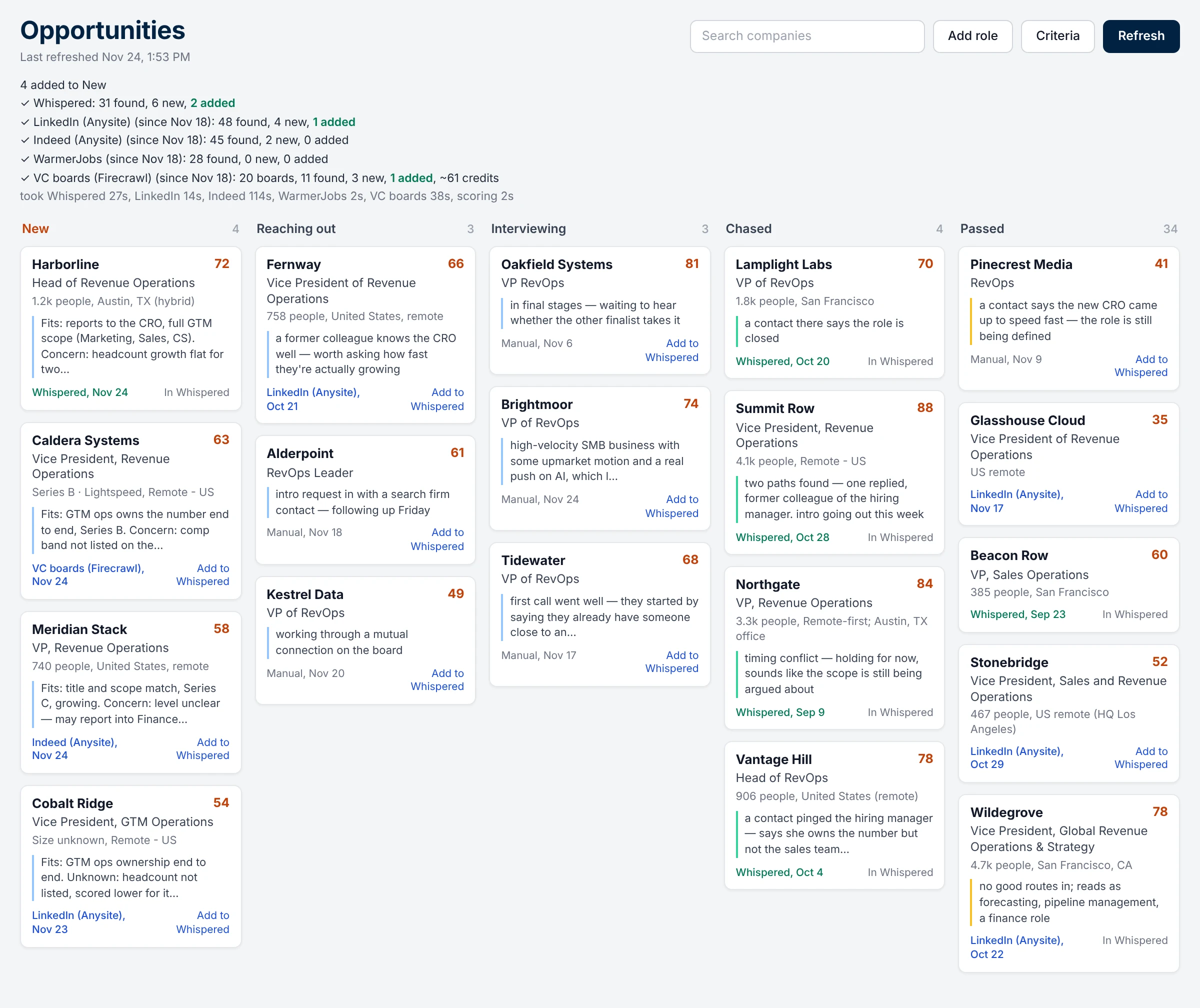
Put together, that is one screen: five columns — New → Reaching out → Interviewing → Chased → Passed — that you drag cards between. Press Refresh and it pulls everything new since last time, scores each role out of 100 against your criteria, and drops whatever clears your threshold into New, best first. Nothing below the bar appears, and nothing searches unless you ask it to.
Everything on the board stays yours — your notes and your intro paths never leave it. And if you are a Whispered member, adding a role the network does not have yet, or sharing what you have learned about a company, is one click from the card.
Where the roles come from
This is the part that is already solved, and it is powered by the tools in our guide to monitoring posted roles. The dashboard is what happens when you stop opening all of them by hand:
- LinkedIn and Indeed through Anysite, newest first, only since the last search.
- VC portfolio boards — twenty of them, Accel through Summit — scraped with Firecrawl.
- Your own scraped postings, if you keep them in Airtable.
- WarmerJobs, for openings at companies where you already know someone.
- Whispered, for the roles that were never posted anywhere.
Each of those on its own is a tab you have to remember to open, on a day you may not feel like opening it.
Iterate on your criteria
Your first thesis is a best guess, however carefully you wrote it. The board treats it that way.
Every card you move asks you to sharpen it. Move one to Passed and it asks why. Move one to Chased and it asks what made it worth chasing. Either way it makes the smallest change to your criteria that captures the answer — with an undo, so a bad answer is cheap — and uses your recent passes and chases as examples the next time it scores anything.
So your criteria are never a thing you wrote once and stopped looking at. They are living, and they get better every time you make a judgment call you were going to make anyway.
Build it
The whole build is one prompt. Copy it, paste it into Claude, answer its questions, and it builds you the board above.
~1,800 words. Every source in it is optional — it checks what you have connected, uses it, and says in the run log what answered. Connect the Whispered MCP and you get the unposted roles too.
Paste it in and it builds the board as an artifact you keep. It will ask you questions first, and on first open it walks you through your criteria — what you are looking for, your deal-breakers, your target titles — because it will not search until those are filled in.
You do not have to use Claude, and you do not have to be a Whispered member. Any AI that can build an artifact and call tools will do, and the prompt is a starting point — add sources, drop the ones you cannot reach, change how it scores. Without the Whispered MCP connected you still get the posted half of the market. You are just missing the unposted roles, which at VP+ is most of them.
Once it is running, the rest of the work is the part that was always yours. Find the unposted roles, and go in through the back door.